
03 · ColorsFolder: 04 Colors
Colors
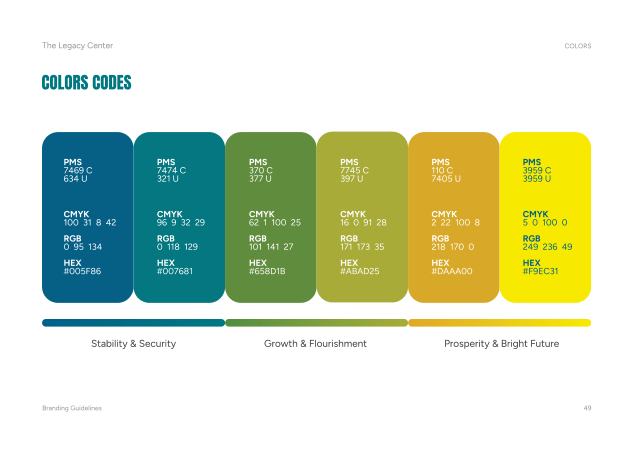
Color speaks before words do. Our palette climbs from blue through green to gold: stability and security, growth and flourishment, prosperity and a bright future. Click any value to copy it.
All color filesGuidelines, color codes, gradient and Adobe swatches. 5 files.
PMS 7469 C / 634 ULegacy Blue
PMS 7474 C / 321 ULegacy Teal
PMS 370 C / 377 ULegacy Green
PMS 7745 C / 397 ULegacy Olive
PMS 110 C / 7405 ULegacy Gold
PMS 3959 C / 3959 ULegacy Yellow
Stability & securityGrowth & flourishmentProsperity & bright future
Tints
Use tints for hierarchy, backgrounds and charts instead of inventing new colors.
Neutrals
Do
- Let one color lead, and add tints and neutrals for hierarchy.
- Use the brand gradient on its own, never layered with other fills.
- Set text in black or a dark neutral for the best legibility.
- Keep charts flat and built only from brand colors, tints and gradients.
- Choose photos in blues, greens, oranges and neutrals, or apply the brand filter.
Don't
- Add colors outside the palette, such as red or purple.
- Use shadows, textures or 3D effects on charts and graphics.
- Put light text on olive, gold or yellow.
- Put yellow, gray and white together on a black background. Use brand blue or teal behind them instead.
- Use the gradient behind busy content that hurts legibility.
Files
pdf
Color codes
PMS, CMYK, RGB and HEX for every color, plus tints and neutrals.
3 pages · 731 KBDownload PDF

pdf
Color guidelines
How the palette, gradient and photo filters work together.
16 pages · 17.8 MBDownload PDF

ase
Legacy Adobe Swatches.ase
Load straight into Adobe Photoshop, Illustrator or InDesign.
4 KBDownload